Climkit is a Swiss company that provides an energy-management platform for residential and commercial buildings, covering everything from electricity and heating to water, collective laundry, and EV and e-bike charging.
Key Insights about Climkit
Energy management since 2017
Climkit started promoting photovoltaic self-consumption for Swiss buildings in 2017. Since that time the company has extended its offer to every form of energy and consumption in a building – heat, cold, water, laundry, and electric mobility.
One platform, every energy source
Climkit manages a building's entire energy footprint through a single set of tools from metering and billing to visualization and optimization. It's accessible to residents via an online platform and mobile app.
Built on open protocols
Climkit relies on open systems and protocols such as Modbus and OCPP. It integrates devices from different manufacturers without locking owners into a single provider. It also offers the same platform as a white-label product to energy suppliers.
Year
2025
Country
Switzerland
Team
4 people
Commits
1364
Development
7 weeks
Challenge
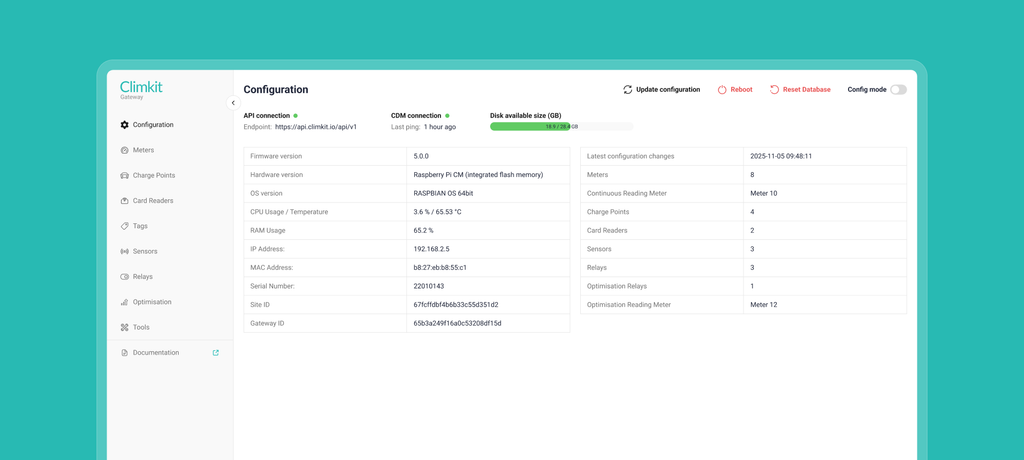
Our collaboration with Climkit focused on redesigning the Gateway Control Panel. It's the internal web tool their field technicians use to configure, monitor, and troubleshoot the energy devices installed in buildings. This panel is the bridge between Climkit's hardware in residents' homes and the staff who keep it running. Making it clear and efficient directly affects how quickly issues get resolved on site.
Climkit's panel had grown into a powerful tool over time, but its interface dumped large amounts of technical data on the user and had become difficult to navigate. They wanted a modern, intuitive frontend without touching the backend logic that already worked.
We faced two main challenges during the project:
1. Intuitive design for a complex internal tool. The existing panel has dense, technical information with little structure. It was hard for technicians to find what they needed and to understand non-obvious states. For example, that certain actions only work while "Config Mode" is enabled, with no indication of this. The redesign had to make the interface and its flows clear and intuitive for experienced technicians and new hires alike, without stripping away the depth they depend on.
2. A lightweight, fast interface for field conditions. Technicians use the panel on site, often over weak 4G connections and on hardware that isn't especially powerful. The interface had to stay lightweight and load quickly to minimize data transferred between server and client, avoid heavy processing, and reduce page-load times on low-bandwidth connections. We also had to keep in mind that a single site can carry anywhere from a handful of meters to several hundred.
Process
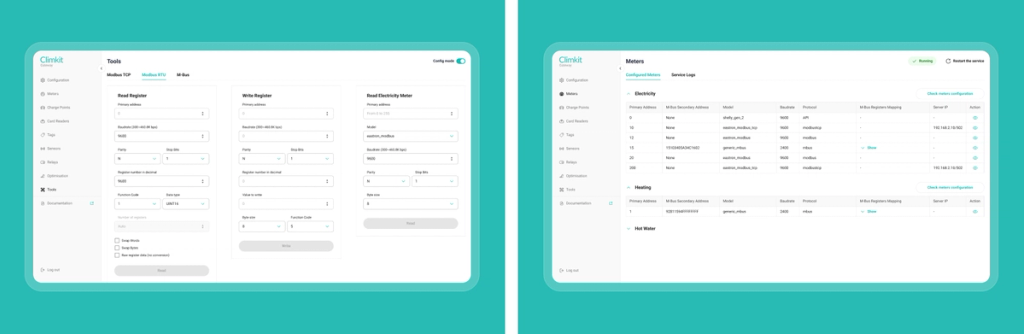
The redesign of the Climkit Gateway Control Panel moved through clear stages, from Scoping and Discovery to Design, Development, QA, and Handover.
During Discovery, the team focused on understanding how the device and its panel work before changing anything. Because this is an IoT product with a lot of domain-specific behavior, we worked closely with Climkit's technical lead, the "knowledge keeper" of the system. We compiled a detailed list of questions about every part of the interface: what each status means, what the configuration buttons do, how meters, charge points, card readers, and sensors report their data. We documented all of it in a document so nothing got lost, which became the foundation for the redesign decisions that followed.
Just as we ask for the physical device on IoT projects, here we asked Climkit for everything needed to work against realistic data and the real system. They provided a SQL database dump loaded with a full set of devices, which we ran locally alongside their backend, plus access to their GitHub so we could work in a dedicated branch, push our changes, and pull them onto the actual gateway to verify the result against connected hardware. Climkit also assigned a contact on their side to help with access and connectivity throughout.
Four team members worked on the project: a Project Manager, a UI/UX Designer, a Developer, and a QA Engineer. Design and development were deliberately overlapped. Once the core screens were approved, the developer began implementing the frontend while the designer finalized the remaining details, which kept the timeline tight.
Pre-Project - 2 Weeks
Agile Development - 4 Weeks
Release - 1 Week
Solution
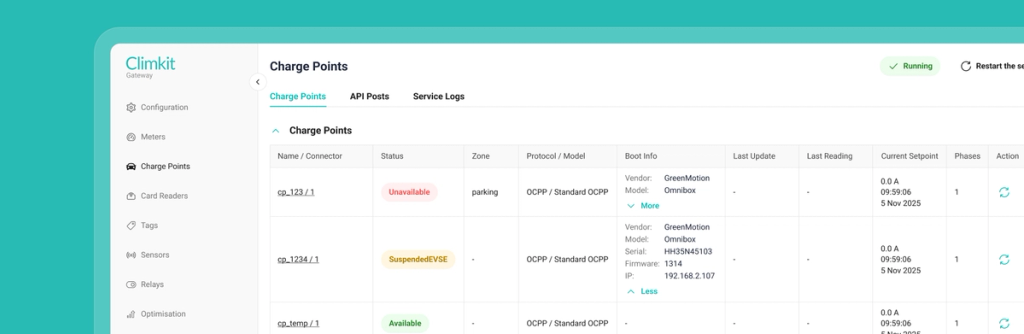
The team combined close collaboration with Climkit's domain expert and a design system built specifically to bring order to a dense, technical interface.
To make the panel more intuitive, we restructured how information is presented across every screen. Dense tables were reorganized so the most important data comes first, with secondary and debugging details collapsed or muted so they no longer compete for attention. Statuses that were previously hard to parse – long lists of green and red values – were replaced with a clear, consistent color system (for example, a distinct color for "in use" or "pending" states versus active or terminated ones), so a technician can understand a device's state at a glance instead of reading every field.
Throughout the interface we added tooltips that explain what each element does and why it's there, turning the panel itself into a guide for both experienced technicians and new hires. To keep everything consistent, our designer built a reusable design system, so every table, status, and component looks and behaves the same way across the tool.
To keep the panel fast and lightweight for field use, we focused on minimizing what the interface has to load and process. Large data sets are loaded progressively rather than all at once, and information and historical data are fetched incrementally to reduce the technician's waiting time on slow 4G connections. Where a device check takes a few seconds to respond, we surfaced clear loading indicators, and we kept layouts compact so technicians can see as much as possible without scrolling or losing sight of the rest of the screen.
Importantly, this was a frontend redesign. The panel's backend logic already worked, so rather than rebuilding it, we connected our new interface to Climkit's existing backend. We prepared and tested the full frontend on a development environment and handed it over as a production-ready build for Climkit to deploy on their own infrastructure.
One of the standout solutions came from a real usability problem the team identified during the project. The panel has a "Config Mode" that must be enabled before certain forms will work, but nothing told the user this. A technician could fill in an entire form, submit it, and have it silently fail, with no explanation of why. Worse, enabling Config Mode at that point reloaded the page and wiped their input. We proposed and designed a clear warning that prompts the user to enable Config Mode before they start, a small change that removed a genuinely confusing dead end. Climkit specifically welcomed this solution, as it solved a problem their tool had never addressed.
In addition to addressing the core challenges, we redesigned and improved the panel's key areas:
-
Configuration. A reworked configuration screen with a sticky header keeping the most-used actions – Update Configuration, Reboot, and Reset – always within reach, while surfacing the frequently used Update action and de-emphasizing the rarely used Reboot and Reset.
-
Meters. Electricity, heating, and hot-water meters combined into a clean, collapsible structure that defaults to a compact overview and lets technicians expand only what they need.
-
Charge points, card readers & sensors. Standardized tables with color-coded statuses and clearer layouts, plus consistent naming across the system (for example, unifying inconsistent terms like "readers" and "tags") to remove ambiguity.
-
Tools & forms. Cleaner Modbus and M-Bus forms with input validation, sensible limits, and clearer result pages, making the panel's most technical actions safer and easier to use.
-
Feedback everywhere. Toast messages confirm when an action succeeds or fails, and tooltips explain statuses and controls in context, so the user always knows what just happened and what to do next.
Testimonials
use arrows below to SHUFFLE THROUGH THE SLIDER
Pauline Gugelot
Product Owner @ Milence
"Stormotion has really delivered on their promises. They’ve been very transparent about their progress, flexible in reacting to changes, and solution-focused in overcoming challenges. If they didn’t know something, they would find out, which gave us great confidence in their ability to go the extra mile."
Case studyClaudio Tesei
Head of Cloud Infrastructure @ Atlante
"We originally got in touch with Stormotion from our original app developer. And very soon we found real value in choosing Stormotion, because they previously had real valuable experience on the field – digital apps working in the realm of EV charging. So, it was really a no-brainer for us to to go with them."
Case studyTodd Gilligan
Innovation Lead @ Force USA
"I had meetings with 30 different agencies and the team at Stormotion gave me the most confidence to go forward. With them you feel like you've got a kind, knowledgable & conscientious team behind you. So I was 100% sure that they're going to be able to deliver our project!"
Case studyJakob Hals
Director of Product Technology @ Norsk Lithium
"Stormotion stood out because of their focus on Bluetooth-connected products. They weren't just app developers, they understood the unique challenges of building mobile app experience for hardware products. Their collaborative approach, technical expertise, and ability to quickly grasp the vision of the North Guardian app made it clear that they were the right fit."
Case studySteve Knight
Founder @ Art of Comms
"If you're thinking of going to Stormotion, you're going to have a very easy team to talk to, to communicate with, to understand what you want to do. They will tell you if you're barking up the wrong tree and are going to waste your time and money. I'd say "give it a go!" and I thoroughly recommend Stormotion."
Case studyPietro Saccomani
Founder @ MobiLoud
"The Stormotion team quickly became our team for everything Native app-related. It would be hard to name all the things that we built over the many years we worked together, but overall, I think we had a good partner who was able to adapt the way we worked, and the way they worked. So that we could ultimately build a product that had the quality that we wanted and with the speed that we wanted."
Case studyMax Sheidlock
Product Manager @ Userlutions
"Given a tough budget and a lack of knowledge in our own engineering team, we quickly came to Stormotion. We had already worked together on previous projects, and I knew that, based on React Native, we could have one engineer responsible for it. That was just amazing because I could really focus on our customer side, knowing that the mobile application for the testers was in very good hands."
Case studySzymon Sołtysiak
Head of Engineering @ Vermietet.de (ImmoScout24)
"Trust Stormotion. Work with them on your road map, on your technical debt. Also, expect feedback because the team is eager to do this. It's what I value and, I think, many startups value."
Case studyTino Marx
CTO @ CheckMyBus
"I highly recommend Stormotion as a service provider for app development. They're young, flexible, dynamic, creative and very fast. The cost of planning and implementation is also reasonable. As they use "pay as you go", have a good plan first – then the result also will be satisfactory."
Case studyGregor Herdmann
Founder & Co-CEO @ PaketConcierge
"Working with Stormotion was a blast! The Project Managers, and especially Alex, are always there for you when you need them to go the extra mile. And it's very easy to communicate with them. Whether it's something urgent or whether it's a bigger task, like building the structure of the architecture, I always felt like I was treated very well. Stormotion delivered a great app experience from day one."
Case study